
I love technology.
Not only do I love what it does for us, but I love fiddling with it. Taking it apart. Seeing what makes it tick. Making it go better.
I’m the sort of person who will notice that a chromatography column is not performing optimally and do something about it (and therein is a weblog entry for another day). But my problem is that, cool as technology might be, the interface is usually really sucky.
Take a random example.

I am reminded (HT) that we used to have one of these babies in Cambridge. We inherited it from the lab down the corridor who’d just bought something shiny and new. We already had an FPLC, which although it had a primitive interface, was reasonably easy to use. And everyone in the lab knew how to use it.
But the AKTA. Ah.
It came with a PC (running Windows. You just know that’s gotta hurt) and some bizarre software that needed individual user accounts and a new sodding program each time you wanted to make the slightest alteration to a protocol. And the manual appeared to have been translated from Swedish to English via Serbo Croat.
By a Himalayan monk.
Fortunately for me, I managed to figure out how it worked (yes, I’m a geek) and didn’t quite get round to making an idiot’s guide to it. Which meant that while my fellow lab rats fought over time on the FPLC, I hardly ever had to book the AKTA to myself. It was mine, all mine. Mwah hah ha–sorry.
It’s not just ‘physical’ technology where the nerds don’t realize normal people are going to use it, either. Gmail went tits-up a little while ago, and I got this wonderfully informative error message:

Now, while ‘Detailed Technical information might be useful to a technician, why the hell is it there for me to click on if all it says is ‘Numeric Code: 66’? I have no idea what that means. I don’t know if that’s a fault with my set up, the Gmail server, just my Gmail account or crabs and lobsters eating the long, damp piece of string carrying electrons across the Pacific. Which means I have no idea about its fixability: more importantly I don’t know whether I should tell Gmail technicians they have an error 66 (‘Oh, right, error 66. Yes, you need to reboot your third quadrant alpha widget’) or what. It tells me nothing–and I don’t even know if it’s the sort of error that is likely to persist.
Nothing. Bad interface.
So, anyway, I got a linkedin update this morning.

And I chuckled at the phrasing of Richard’s concern, and my finger hovered over the ‘delete’ button, when I realized ‘Monday’ was trying to get my attention. So I auxiliary-clicked it:

Ooh, I thought. How neat. And I selected ‘Show This Date in iCal’ and lo! it was revealéd unto me:
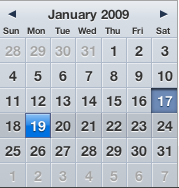
Isn’t that so totally and utterly awesome? Technology with an interface that actually makes life easier. We want more like this, please.
And I know that I sound like an Apple fan-boy here, but that’s just tough. The reason we love our Macs is precisely because of the interface.


I recently switched to Apple’s Mail program (having finally become an iPhoney) and noticed this nice link between emails and the iCal program. That said, iCal isn’t entirely without clunks. And entering events on the iPhone itself could be slicker. Apple are good at interfaces, great even, but not yet perfect!
I think not being perfect is in the business plan, Stephen. Otherwise, why would you want to upgrade?
yahoo mail has the same function with their calendar, but I’m not sure whether it would recognize just ‘Monday’ – it definitely does this for ’21 January 6-7 pm’ and similar stuff. Haven’t tried it hooked up with MS Outlook yet, but suspect it would work. And when it comes to scheduling, Outlook is hard to beat… I’m a mixed Apple/PC gal (work/home). Still, I don’t even know about half of the things out there that are possible these days, and don’t seize to be amazed by technology on a regular basis!
I love the way that if a telephone number appears in a web page on the iPhone, you can click on it and the telephone function flashes up and offers to dial the number for you and/or save it to your contacts. (Its map function also saved me from being hopelessly lost for too long in a slightly dodgy alley behind Euston Station as I was being tortured by the smell of curry wafting down Drummond Street, but that’s another story.)
Sound like a story you should tell…
And yes. I’m getting an iPhone in the UK.
You know, that iCal dropdown widget thingummy looks rather useful. I’d be in agreement with Steffi that Outlook works nicely for scheduling things, except that for some obnoxious institutional reason, this laptop has Outlook Express on it, which doesn’t.come.with.a.calendar. Argh.
Oh, and I should update that LinkedIn thing to say “sweating bullets”. Double argh.
It’s okay—unfortunately the interface with Address Book is slightly bizarre. It recognizes phone numbers but I can’t seem to make it add them automatically to an existing contact.
I think it’s in league with Jenny to make me get an iPhone.
Oh, and remind me to rant about power supplies one of these days.
Yes, I’m in a ranty mood. Can you tell?
iPhoney – I like it!
Power supplies? I hates ’em. Heavy things. I decided to investigate buying a second one for this Sony Vaio, so I don’t have to haul one back and forth between work and home.
Being a Sony, it’s around $149. For a freakin’ transformer, bridge rectifier, some smoothing caps and voltage rectifiers. 4.5 Amps’ worth, to be sure, but honestly. $150?
Oh sorry, guess I’m in a ranty mood too. 😛